
Program-Level Approval Verified
Your specific degree program is listed, not just the institution.
Introduction
School not in WEAMS? We will walk you through the exact VA verification steps to confirm approval status before enrolling in any hybrid program.
This page explains what to do when a search on the VA database returns no results for your school or program. It targets working veterans and transitioning service members who plan to use Post-9/11 GI Bill benefits for a hybrid program. You can use the steps here to determine the real reason behind the missing listing. Then decide whether to proceed safely or explore verified alternatives.
VeteranDegrees serves as a guidance platform. It lists VA-verified hybrid programs and guides veterans through the verification process. However, it does not act as a school or VA authority.
The WEAMS (Web Enabled Approval Management System) database functions as the VA’s official tool for checking which schools and programs qualify for the VA GI Bill benefits. A “school not in the GI Bill School database (WEAMS)” result does not always mean the program lacks approval.
Common causes include search terms that do not match the facility's exact name, program-level details not yet updated, or pending requests through the School Certifying Official (SCO) and State Approving Agency (SAA).
Hybrid programs must appear as resident training, not distance learning, to qualify veterans for the full housing allowance (BAH), instead of the reduced online rate. The following steps help you identify which situation applies to your case and what to do next.
This foundation prevents costly mistakes. Too many responsibilities. Families to care for. Bills that cannot wait. A wrong assumption here can mean zero housing allowance for an entire term.
What WEAMS Is and Why Every Program Must Be Listed There
The WEAMS is the official VA GI Bill School Database, a system for verifying school and program approval for GI Bill benefits. Veterans and beneficiaries use the public interface, now integrated into the GI Bill Comparison Tool, to search for approved colleges, universities, and specific programs. Absence from a basic search does not automatically confirm non-approval. The three most common reasons a WEAMS search returns no result are mismatched search terms or facility codes, program-level details not yet reflected, even when the school appears at the institution level, and pending updates requested through the SCP or SAA.
WEAMS searches can return results at two levels. You may find the school listed under its facility code and main campus details. That does not guarantee every degree or certificate qualifies. Each program must appear individually as approved. Schools submit new programs or format changes to their State Approving Agency. It reviews them. Then the VA updates the record. The process takes time. A school approved years ago may still show gaps for newer hybrid (online class with at least one in-person class) offerings or revised delivery formats.
Hybrid programs require special attention here. They must appear in WEAMS as resident training, not distance learning, to qualify veterans for full BAH. The VA certifies hybrid courses (those with any required in-person component) as in-residence training. This unlocks the full local rate based on the campus zip code instead of the reduced online rate. A program listed only as distance learning, even with some campus sessions, will not deliver the full housing allowance you expect.
The steps that follow help you figure out which reason applies to your situation. They keep you from walking away from a legitimate option or committing to one that truly lacks approval. Mortgages keep coming. Kids need school supplies. One term of lost housing allowance sets you back months.
Step 1 - Search WEAMS Again Using the Correct Terms
The standalone WEAMS Public portal was removed in 2025. All approval data that was previously in that database now lives in the GI Bill Comparison Tool at VA.gov. The underlying approval system is the same. The front door changed.A search that returns no result in the Comparison Tool is a search input problem more often than it is an approval problem. Before drawing any conclusions about a school's status, try three specific techniques.
🔎 Search by facility code, not by school name.
Names in the tool are exact. A single word difference between how a veteran types a school name and how it appears in the database returns nothing or returns the wrong campus. Facility codes do not have this problem. Enter the school's facility code in the "Search by name" field and the result is unambiguous.
-webp.webp?width=1011&height=440&name=GI%20Bill%20Comparison%20Tool%20-%20Search%20by%20Facility%20Code%20-%20VeteranDegress%20(2)-webp.webp)
Figure 1: GI Bill Comparison Tool showing a facility code search query.
How to find the VA Facility Code?
- Ask the school's admissions or VA certifying office directly.
- VA Education Call Center: Call 1-888-442-4551 to speak with a representative.
- Ask VA (AVA): Submit an inquiry online via the "Ask VA" portal
https://www.my.vavet.sites.va.gov/vclchat
🔎 Search by location, then filter by state.
The tool's "Search by location" tab lets veterans search by city, state, or ZIP code. Use the state filter to narrow results and scroll the list manually. This bypasses name-matching entire
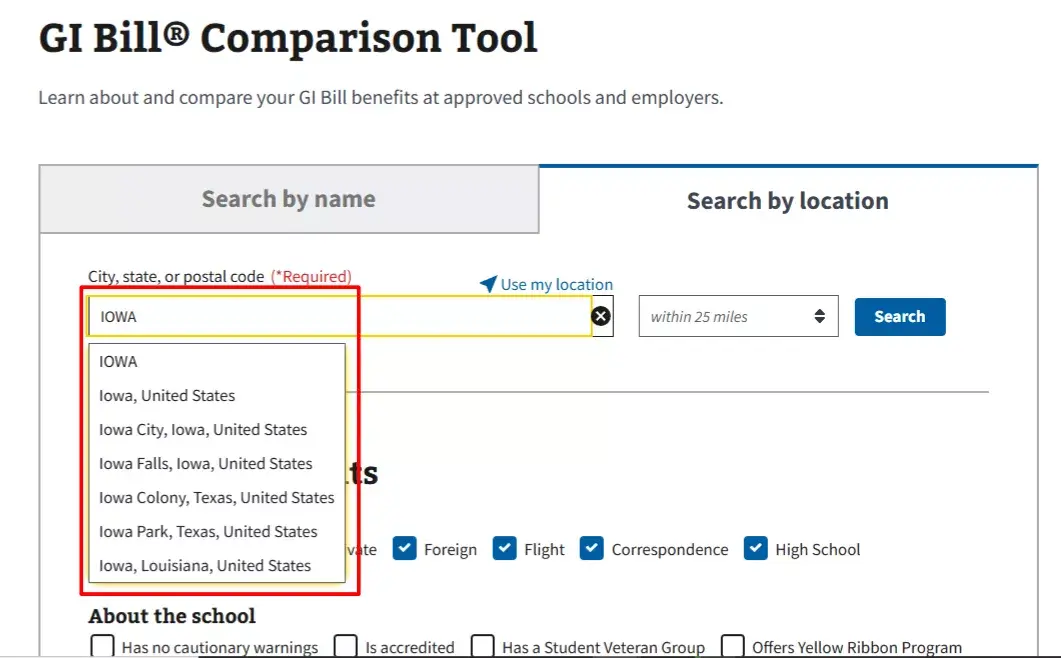
Figure 2: GI Bill Comparison Tool showing a location search query.
🔎 Check for parent institution listings.
Some schools appear under a parent campus name rather than the branch or extension name a veteran recognises. A hybrid program offered at a regional campus may be listed under the main institution's record, not under a regional division or extension school name. If the regional name returns nothing, try the parent institution's name.
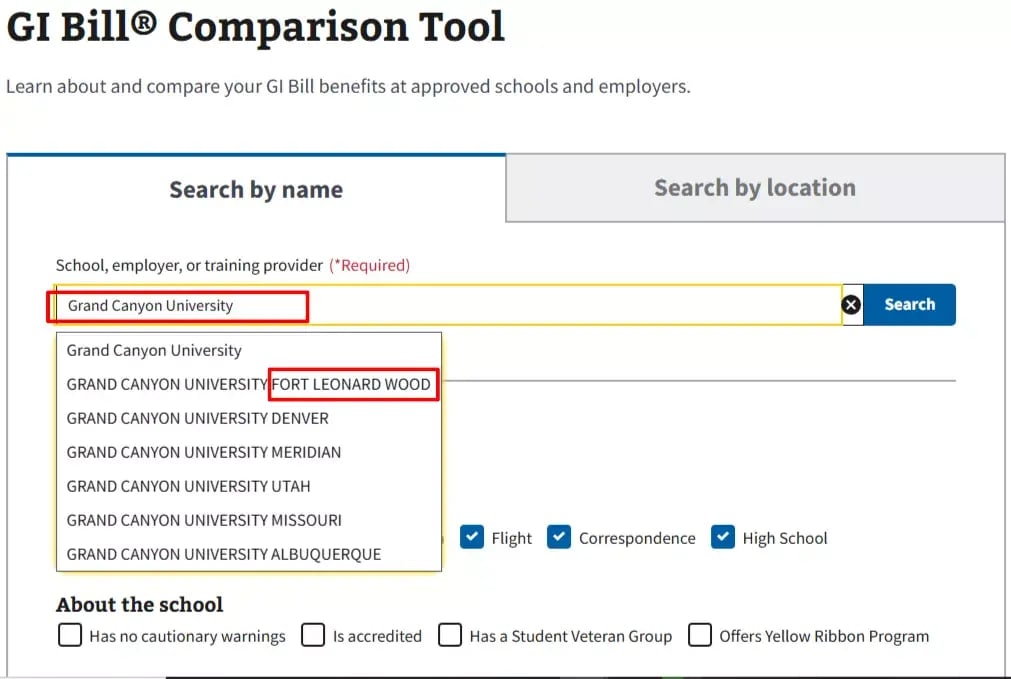
Figure 3: GI Bill Comparison Tool Showing Grand Canyon University Search query with different campuses showing in the dropdown result.
If a facility code search returns a result, move to Step 2 to check the specific program. If it still returns nothing, move to Step 3.
Step 2 — Check Whether the Specific Program Is Listed, Not Just the School
Finding the institution in the Comparison Tool is not a final step. Not all programs at a VA-approved school are automatically approved for GI Bill benefits. Each program must be individually listed and approved at the program level.
As of June 2025, the GI Bill Comparison Tool added a dedicated Programs section to every institution's detail page. This is where veterans verify program-level approval directly, without contacting anyone. Open the school's detail page and scroll down to the "Approved Programs of Study" section. It lists every program currently approved at that facility for GI Bill reimbursement.
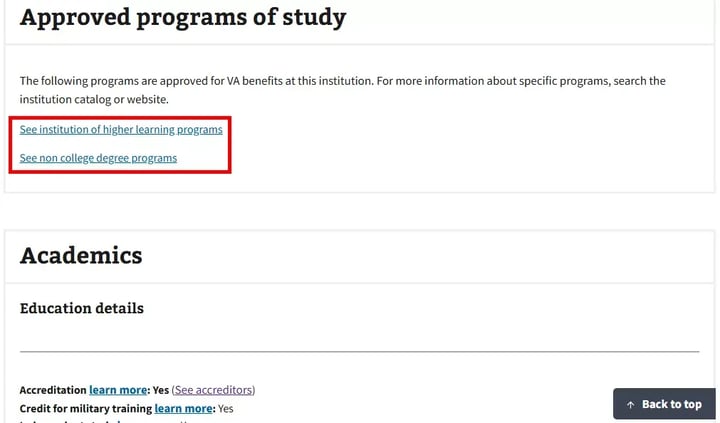
Figure 4: GI Bill Comparison Tool Showing the "Approved Programs of Study" Section.
You will then be redirected to the program search tool webpage.
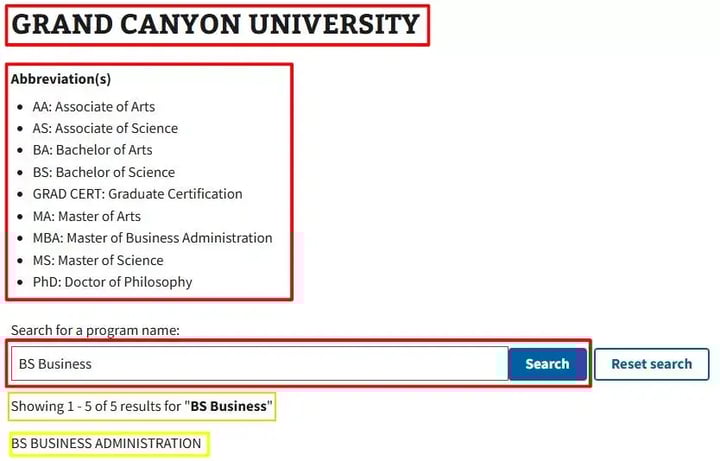
Figure 5: GI Bill Comparison Tool Showing the "Approved Programs of Study" Section.
Two checks apply here.
Confirm the degree program appears by name. If the specific program the veteran intends to enroll in does not appear in the Programs section, institution-level approval does not extend to it. The program is not approved and GI Bill benefits cannot be applied to it.
Next, check the learning format at the school level, then confirm with the SCO. The GI Bill Comparison Tool does not display a delivery format classification for each individual program in the Programs section.
What the tool does provide is a school-level "In-Person Attendance" question under "Update tuition and housing estimates." Answering "Yes" to "Will you be taking any classes in person?" adjusts the housing allowance estimate to the full local rate. Answering "No" drops it to the flat online rate.
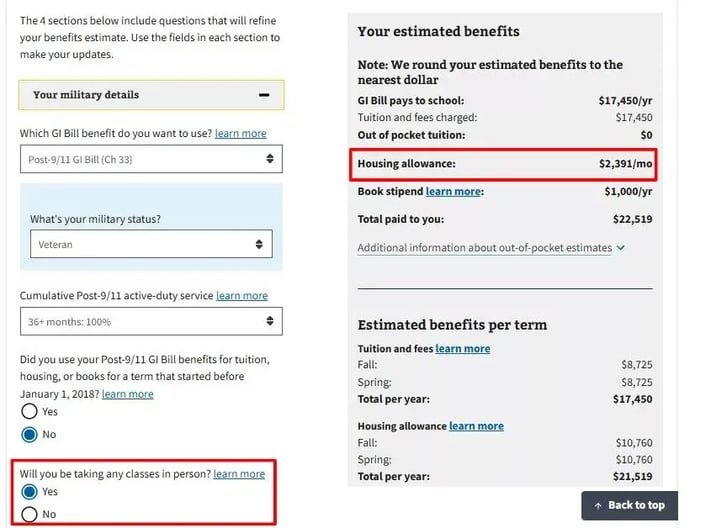
Figure 6: GI Bill Comparison Tool Showing Military Details Filter Feature. You will see this below the chosen institution you've chose to view.
That question is a planning tool, not a verification mechanism. It reflects what the veteran tells the tool, not what the VA has officially classified the program as.
To confirm whether a specific hybrid program is classified as resident training for VA certification purposes, the veteran must contact the school's VA certifying official (SCO) directly and ask how the program is reported to the VA.
That answer determines the actual housing allowance rate, not the estimate in the tool.
If the specific program is absent or classified incorrectly, the next step is to contact the School Certifying Official. Get written confirmation on the exact status and any pending updates.
This check prevents a common enrollment error. You avoid committing time and money only to discover later that the hybrid (online and at least one in-person class) format does not qualify for full housing allowance.
Step 3 — Contact the School Certifying Official (SCO)
If Steps 1 and 2 do not produce a confirmed program-level listing in the GI Bill Comparison Tool, contact the School Certifying Official next.
An SCO is the VA-designated staff member at a school responsible for certifying veteran enrollment and reporting it to the VA. It serves as the direct link between the school and the VA. They handle accurate enrollment certifications that trigger your GI Bill payments, including housing allowance.
Reach them through the school's veteran services office, financial aid department, or dedicated veteran portal. Most schools list contact details on their website under military or veteran student resources. Ask for the name and email of the current assigned official. Send your request in writing. Include your specific program name, delivery format, and planned start term.
Prepare three targeted questions:
- Is this specific program approved for Post-9/11 GI Bill benefits?
- Is it listed in VA records as resident training or distance learning?
- If it is not yet listed, is a WEAMS approval request in progress, and what is the expected timeline?
Specifically ask them to confirm whether the hybrid program (other term is blended learning) format is certified as resident training in VA records, not just whether the school holds general VA approval. The classification determines your housing allowance. Verbal assurance from admissions staff is not sufficient. Request written confirmation from the SCO before you enroll.SCOs can request updates through their State Approving Agency when needed. You do not navigate the process alone. Still, get that written confirmation in hand. It protects you from surprises after classes begin.
This step provides the clearest picture when self-search falls short. It keeps your hybrid program on track for full housing allowance.
Step 4 — Contact Your State Approving Agency (SAA)
If the SCO has not initiated a request or if the school lacks a certifying official, contact your SAA directly. This step applies especially to newer or smaller institutions where approval records may lag.
State Approving Agencies (SAAs) are responsible for approving schools and programs for VA education benefits at the state level. If a program is not in the GI Bill Comparison Tool, the SAA is the entity that initiates the approval process and forwards it to the VA for WEAMS listing.
Find your them through the National Association of State Approving Agencies directory at nasaa-vetseducation.com/nasaa-contacts. The directory lists each state’s approving agencies with website, email, and phone details. Contact methods vary. Some use web forms. Others prefer direct email or phone. Provide the school name, your specific program, the hybrid or low-residency delivery format, and your question about whether an approval request is on file or in progress.
Keep records of every communication. SAA approval processes take time. Typical timelines range from 30 to 60 days or longer depending on the completeness of the submission and current workload. Do not enroll while waiting unless you receive written interim guidance from the VA that confirms benefits will be honored for that term.
This escalation path gives you another layer of verification depth. It helps when the SCO route stalls. Use it to protect your hybrid program path to full housing allowance.
If the School Is Genuinely Not VA-Approved: What Veterans Must Know
If all four verification steps return no confirmation of VA approval, the school or program is likely not approved. State this plainly. Benefits are not paid for unapproved programs.
The concrete risk is clear. You receive no housing allowance. No tuition coverage. No GI Bill benefits for that enrollment term. Benefits do not apply retroactively once approval comes later. If you enroll and discover the issue after classes begin, there is no reimbursement path. The financial exposure covers the full cost of tuition plus the lost housing allowance for the entire term.
This risk hits hybrid programs especially hard. Enrolling in a hybrid program that is not VA-approved means you receive no housing allowance, no tuition coverage, and no GI Bill benefits for that enrollment term. You end up paying out of pocket while still managing work, family, and the demands of the program itself.
Instead of enrolling at risk, search for a VA-verified equivalent hybrid program. Our platform lists programs already confirmed as VA-approved and classified as resident training.
This section marks a clear stopping point in the verification workflow. You now know exactly when to walk away.
Final Verification Checklist Before Enrollment
Before committing to any program, complete each of these checks. This is the last filter between uncertainty and confirmed eligibility.
The 5-Step Confirmation Checklist WEAMS Search Confirmed
- 1. The school appears in the WEAMS database, and the correct campus or facility code matches your intended location.
- 2.
- 3.
Hybrid Format Classification Checked
The program is certified as resident training, not online or distance learning. - 4.
SCO Written Confirmation Secured
You have written verification from the SCO confirming approval and classification. - 5.
No Pending Approval Dependencies
You are not relying on a future or in-progress approval request to receive benefits.
Why This Checklist Matters
Each step closes a different risk gap. Missing even one can result in reduced or denied housing allowance. Hybrid programs only deliver their full financial benefit when correctly verified at the program and format level.
VeteranDegrees exists to guide this exact process. Programs listed on the platform are positioned within this verification framework so you can move forward with clarity, not assumptions.